How Entrepreneurs Can Reclaim Time and Boost Efficiency with Smart Tools
For small business owners and solo founders running lean teams, the days can feel swallowed by entrepreneur time management demands that never stop. Between startup challenges like setting up systems and winning customers, and daily business efficiency hurdles like admin, follow-ups, and coordination, work expands until it crowds out the work that actually grows the business. These founder productivity barriers aren’t a personal flaw, they’re a predictable result of doing too much manually and keeping too much in one head. With the right support, time becomes something business owners can protect and direct.
Apps That Buy Back Hours Each Week
If your days feel chopped into tiny, stressful fragments, you’re not imagining it, your biggest “time leaks” usually live in repeatable tasks. Here’s a beginner-friendly shortlist of productivity apps for entrepreneurs that covers the essentials, so you can shore up the same pain points you identified earlier and get momentum fast.
Build your “Finance Stack”: Choose financial management software for bookkeeping, invoicing/payment collection, and receipt/expense capture. Many owners regain hours when they stop chasing paper and reconciling transactions manually, budgeting, expense monitoring, saving, tax preparation much easier is exactly what these tools are designed for. Set a weekly 20-minute “money review” on the calendar: categorize expenses, send invoices, and flag anything that needs follow-up.
Create a “One Home for Work” system: Pick one project/task manager plus one notes/knowledge app, then make them your default. This cuts down the constant context switching, shifting between tasks can cost you up to 40 percent of your productive time, because you’re not hunting for the latest file, idea, or to-do. Start today by building three lists: “This Week,” “Waiting On,” and “Someday.”
Automate your marketing rhythm: Use digital marketing tools for email/newsletters and social scheduling so promotion stops being a daily scramble. Set up a simple cadence: one weekly email + three social posts, all batched in a 60–90 minute block. Add a template library (offers, FAQs, testimonials) so every campaign starts from a proven draft rather than a blank page.
Standardize team communication: Choose a team chat tool and a video meeting tool, then create rules that protect focus time: channels by project, fewer DMs, and “decision summaries” posted after meetings. Put meetings on a default 25- or 50-minute setting and require an agenda doc link in every invite. This keeps collaboration from becoming a full-time interruption.
Make travel planning “one-and-done”: For travel planning applications, pick one itinerary organizer and one expense/travel-receipt tracker. Build a reusable trip checklist (flight, hotel, ground transport, packing, client agenda) and duplicate it every time you travel. When you land, you should already know where you’re going, what you’re doing, and where the receipts will live.
Turn hiring into a pipeline: Use a hiring and recruitment app to manage candidates, templates, and follow-ups in one place. Create three reusable pieces: a scorecard for the role, a structured interview question set, and an evaluation form so you’re not “winging it” for every applicant. Even if you only hire a few times a year, this prevents the last-minute rush when you really need help.
Upgrade Your Images in Minutes With AI Upscaling
Once you’ve chosen a handful of apps to streamline the work, your visuals are an easy place to win back even more time without sacrificing polish. AI-powered image tools help entrepreneurs and small business owners create, enhance, and customize professional marketing visuals fast, so you can show up consistently across channels and keep engagement high without adding hours of design work.
One of the most practical upgrades is an AI image upscaler: it boosts resolution and sharpens clarity so you can enlarge photos while preserving detail and overall visual quality. That means a small product photo can become a crisp hero image, and older marketing assets can be refreshed and reused instead of reshot. If you want a simple option, the Adobe Firefly AI image enlarger is an example of an AI upscaler designed to increase size while keeping images looking clean and professional.
Smart Tool Options at a Glance
This table helps you compare common time-saving tool categories by what they do best, where they fit in your workflow, and what to watch for before you commit. Since only 18 percent of firms had adopted AI by year-end 2025, choosing tools you will actually use matters more than chasing every new feature.
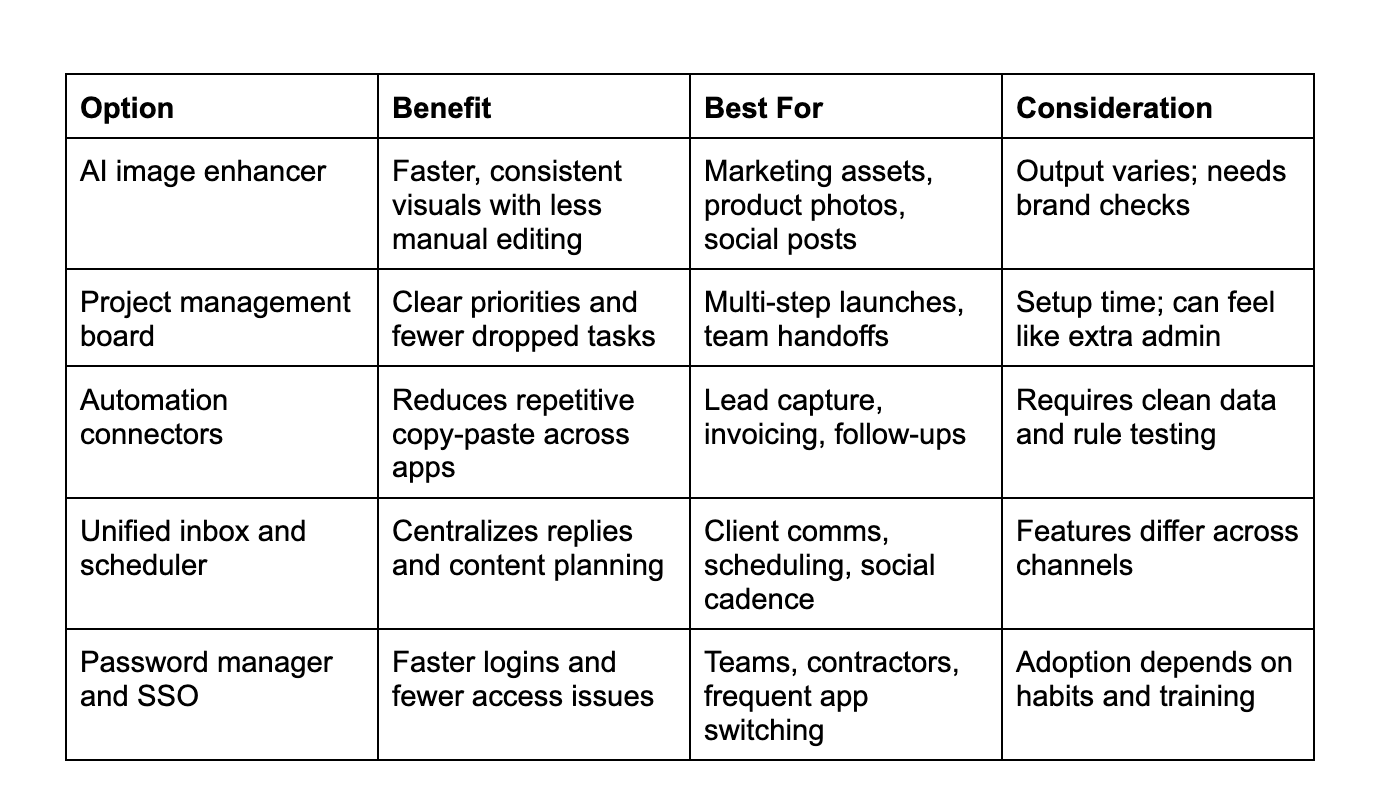
Use this as a quick productivity tool evaluation: pick one “core” tool that removes daily friction, then add one integration that eliminates a repeatable task. A simple cost-benefit analysis keeps the focus on time saved versus complexity added. Once you see your best-fit path, the next step feels straightforward.
Smart-Tool FAQs: Security, Setup, and Real ROI
Q: What if a time-saving app puts my client data at risk?A: Start with basics you can verify: encryption, role based access, and strong login protection like 2FA or SSO. Limit permissions by job, and keep sensitive files in one approved system rather than scattered across tools. If you cannot find a clear security page or export your data easily, treat that as a dealbreaker.
Q: How do I make sure it works on both mobile and desktop?A: Check for feature parity, not just “has an app,” because some mobile versions only support viewing. Before you subscribe, run one real workflow on your phone and laptop: capture a task, attach a file, assign it, and close it. Also confirm offline access and notification controls so the tool helps instead of interrupts.
Q: When is the best time to onboard without losing a week of productivity?A: Pick a lighter week and block 60 to 90 minutes for setup plus 15 minutes daily for five days. Import only one project or pipeline first, then expand once the structure feels natural. A small pilot keeps momentum and reduces the urge to abandon the tool.
Q: Can user reviews actually predict whether I will save time?A: Yes, if you filter for reviews from businesses your size and look for repeated mentions of “setup time,” “automations,” and “support quality.” Favor reviews that describe before and after workflows, not just star ratings. Treat one dramatic review as a story, and recurring patterns as a signal.
Q: Should I worry that monitoring or tracking features will hurt team trust?A: It can if it feels secretive, so set a written policy that explains what is tracked and why, and focus on outcomes not surveillance. The fact that 76% of North American companies use monitoring tools does not mean you have to use them aggressively. Use opt in training, transparent dashboards, and clear boundaries to keep the tool supportive.
Lock In Real Free Time With One Smart Tool Today
Running a business shouldn’t mean spending every day chasing tasks, toggling between apps, and watching the calendar fill itself. The path to entrepreneurial efficiency gains is simple: choose a few business growth tools that remove friction, set them up thoughtfully, and let consistent systems carry the load. Done well, technology adoption encouragement turns into real time-saving strategies and work-life balance improvements, more focused work hours, fewer loose ends, and cleaner decisions. The right tool doesn’t add work; it gives time back.